John Smith Legacy
32xThe classic medieval texture pack. Rustic stone, weathered wood, and aged metals create an authentic medieval atmosphere for castles and villages.

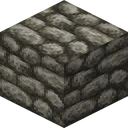
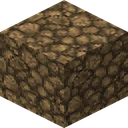
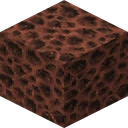
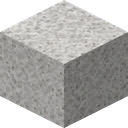
What John Smith Legacy looks like on blocks

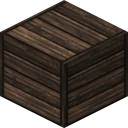
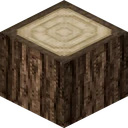
Those nine blocks are drawn straight from the texture files inside John Smith Legacy itself, at 32x. Every pack on this site is rendered in the same nine positions, so lining John Smith Legacy up against another render shows nothing but John Smith Legacy's own art.
Details
- Creator
- John Smith Legacy Team
- Resolution
- 32x
- Category
- Medieval
- Compatibility
- Java Edition
- Performance Impact
- Low
- File Size
- 18 MB
- Last Updated
- 2025-01-30
Features
- Medieval aesthetic
- Custom GUI
- Connected textures
- Random mob textures
- CTM support
Supported Versions
Tags
About John Smith Legacy
John Smith Legacy is a 32x medieval texture pack for Minecraft, created by John Smith Legacy Team. Swap in John Smith Legacy and the game shows rugged, hand-worn stone and timber suited to castles, keeps, and old-world towns instead, carrying a rustic, lived-in fantasy atmosphere. HD territory means John Smith Legacy shows visibly more grain per surface without the memory appetite of the very large packs.
John Smith Legacy earns its place because it carries a classic, long-respected look, goes for a rustic, hand-worn finish, reworks stone and masonry in particular, and gives timber and planks a richer grain. In John Smith Legacy, cobblestone, bricks, wood, and thatch are reworked into weathered, kingdom-ready building materials. Up close in John Smith Legacy or far away in John Smith Legacy, the 32x detail holds.
John Smith Legacy makes Java Edition the target, covering everything from Minecraft 1.19 to 1.21. The download is 18 MB and the impact rates low, which points it at survival players and builders alike.
Each block face carries 1024 pixels against vanilla's 256, roughly 4 times the detail to work with. Our listing records 4 supported versions for John Smith Legacy and a last update of 2025-01-30.
What John Smith Legacy changes
John Smith Legacy is built on 32x artwork. These are the changes you can actually see:
- The grid moves up to 32x, giving each surface far more room for detail than vanilla allows.
- Medieval aesthetic: reinforces the pack's rustic, old-world character.
- Custom GUI: carries the same styling into menus, inventory, and hotbar.
- Connected textures: joins neighbouring blocks into seamless surfaces instead of repeating a tile.
- Random mob textures: gives creatures restyled textures in keeping with the pack.
- Across the block list cobblestone, bricks, wood, and thatch are reworked into weathered, kingdom-ready building materials.
How to install John Smith Legacy (Java Edition)
- 1Keep the John Smith Legacy .zip (18 MB) zipped, place it in the folder behind Options, Resource Packs, Open Pack Folder, then select it from the list.
- 2Install OptiFine, or Iris with the connected-textures extension, so John Smith Legacy's connected textures and custom models render correctly.
Need John Smith Legacy's steps spelled out one by one? See our complete install guide.
Performance & requirements
The HD step up costs John Smith Legacy a modest amount of video memory, and most mid-range GPUs absorb it at full frame rate, with only old or integrated graphics dipping in busy scenes.
It covers Minecraft 1.19 up to 1.21, so aim for that top version on Java; earlier worlds tend to load it fine regardless.
18 MB of textures sit comfortably in memory on any modern machine; allocating 4 GB or more of RAM to Minecraft keeps chunk loading smooth.
What is inside John Smith Legacy
There are 16,605 texture files in John Smith Legacy, of which 236 move: water, fire, portals and the rest of the things that never stand still. It also ships 848 custom models, so some blocks and items change shape and not only their surface.
The bulk of it sits in blocks (8,835 files), followed by items (4,729) and interface (596). Reading the width out of the files themselves, 11,939 of 13,549 block and item textures come in at 32 pixels, which is what the pack claims to be.
1,117 of those sit in a connected textures set. That part needs OptiFine or a mod that reads the same format, and without one the pack still loads, those blocks simply do not join up. It reaches past the visuals as well, replacing 1 sound files.
- Texture files
- 16,605
- Of those, blocks
- 8,835
- Of those, items
- 4,729
- Of those, interface
- 596
- Of those, mobs and entities
- 328
- Of those, sky and weather
- 11
- Of those, font
- 5
- Of those, particles
- 3
- Of those, paintings
- 1
- Animated textures
- 236
- Measured texture width
- 32 px
- Custom models
- 848
- Of those, connected textures
- 1,117
- Sound files changed
- 1
John Smith Legacy carries 6,063 extra textures
The coverage is narrow and the addition is enormous. 191 of the game's blocks are redrawn and 1,078 are not, but the pack ships 6,063 block textures that have no vanilla counterpart at all, by far the most of anything here. Those are the connected and variant textures that make its stone walls tile without seams, and they only appear when a mod is there to read them.
So the pack you see with no mod installed is a small one, and the pack you see with one is a different animal. Where it does replace, it goes darker: 10.3 points below the original brightness with colours 9.4 points closer together, which is the medieval, overcast register it is known for. 187 of the 191 measure 32 pixels and four are 64.
John Smith Legacy FAQ
Is John Smith Legacy free to download?
Yes, John Smith Legacy is free. No account and no payment stands between you and John Smith Legacy: 18 MB is the whole John Smith Legacy download, and 16,605 texture files sit inside John Smith Legacy. January 2025 is the John Smith Legacy revision behind that button.
Which Minecraft versions does John Smith Legacy support?
John Smith Legacy names 4 of them: 1.19, 1.20, 1.20.4, 1.21. 1.21 is where John Smith Legacy stops, and 1.19 is the oldest John Smith Legacy names, plus January 2025 is when that John Smith Legacy list was stamped.
How much detail does John Smith Legacy add?
1024 pixels fill one John Smith Legacy face, against 256 in vanilla: 11,939 of 13,549 John Smith Legacy textures measure 32 pixels wide. 16,605 texture files sit in John Smith Legacy altogether. 18 MB is what John Smith Legacy weighs on disk.
What hardware does John Smith Legacy want?
John Smith Legacy wants mid-range hardware, and 18 MB of John Smith Legacy fits inside most cards: 16,605 John Smith Legacy textures sit in memory. Integrated chips dip once John Smith Legacy fills the screen.
What does John Smith Legacy actually include?
John Smith Legacy lists 5 of its own: medieval aesthetic, custom GUI, connected textures, random mob textures and CTM support. 848 custom models give John Smith Legacy new shapes, not only surfaces, and 236 textures in John Smith Legacy move rather than stand still. 1 sound files change inside John Smith Legacy too.

Is OptiFine required for John Smith Legacy?
John Smith Legacy loads without it, and 1,117 textures form John Smith Legacy's connected set. John Smith Legacy was built assuming OptiFine or Iris. 32x art in John Smith Legacy shows up regardless.
How do I install John Smith Legacy?
Drop the John Smith Legacy zip into resourcepacks, unchanged. Leave John Smith Legacy zipped: Minecraft reads John Smith Legacy packed, plus 18 MB loads exactly as John Smith Legacy was packed. 1.21 is the newest John Smith Legacy build named.
How big is the John Smith Legacy download?
18 MB, the way John Smith Legacy is packaged. 236 animated textures sit in John Smith Legacy: 1024 pixels per John Smith Legacy face explain the rest, and January 2025 is when John Smith Legacy last grew larger.
Who makes John Smith Legacy?
John Smith Legacy is its own project. January 2025 carries the latest John Smith Legacy pass, plus 1.19 through 1.21, 4 John Smith Legacy versions in all, and 16,605 John Smith Legacy files carry their signature.
What is John Smith Legacy best at?
John Smith Legacy is medieval, tagged classic, rustic, stone by its author, plus 5 John Smith Legacy features are named, medieval aesthetic first. John Smith Legacy holds from 1.19 to 1.21: 16,605 John Smith Legacy files back that up.
Does John Smith Legacy need OptiFine?
No for playing John Smith Legacy, yes for one detail. 1,117 files in John Smith Legacy belong to a connected set, against 15,488 that stand on their own, and only that first group asks for OptiFine or an equivalent mod. Vanilla Minecraft loads John Smith Legacy regardless, animations included, all 236 of them. What you give up without the mod is the seamless join on those 1,117, not the pack. Put differently: 93% of John Smith Legacy needs nothing, 1,117 files want OptiFine, 15,488 do not, 236 animate anyway, and John Smith Legacy loads on 16,605 counts regardless of which client you open John Smith Legacy in.
More Medieval Packs
Dokucraft actually ships as three separate looks in one download, from bright to the dark variant this listing covers, each with its own animated textures.
Conquest leans on connected textures so heavily that walls and floors read as continuous stonework, not tiled blocks, with 3D models and custom sounds added on.
Chroma Hills pushes color saturation up rather than down, aiming at an RPG look rather than realism, with custom paintings tuned to match.
Mythic goes gritty on purpose: worn stone, dim tones, and mobs redrawn for dungeons rather than daylight, with detail built for close-up gritty texture work.